Cookie Preferences
We use cookies to enhance your experience and analyze site traffic. You can choose which cookies to accept.
One platform. All workflows.
Teachers.guide is a school Educational Intelligence Layer™ for policy, teaching, SEND, planning, assessment, leadership. and family engagement — built around your values, not a generic AI prompt library.
THE EDUCATIONAL INTELLIGENCE LAYER™ IN CLASSROOMS.
Turn information into action.
Your school's existing information flows into one intelligence layer — and back out as aligned planning, teaching, SEND provision and family communication.
Teachers.guide's Educational Intelligence Layer™ puts your school's information to work — consistent, evidence-aligned, and reducing teacher workload by using what the school already knows.
Planning
Plan a lesson, and create everything it needs.
The Planning Module helps develop the full lesson – in a range of pedagogies and then builds the slide deck, worksheets, quizzes and knowledge organisers that go with it. Everything stays editable before it reaches a class.
- Complete lesson plansYour pedagogy, objectives, sequencing and checks for understanding.
- PowerPoint slide decksImage left, bullets right, with misconception callouts built in.
- Adaptive resourcesWorksheets, quizzes and organisers ready for the classroom.


Teaching
Zones.
Zones runs alongside any Classroom Independent Work task — showing who is writing, who is stuck, and what they are typing. Mirror any pupil’s work without leaving your seat.
- Live pupil statusWriting, stuck or submitted — updated as the lesson runs.
- Mirror any draftOpen a pupil’s work in a read-only pane, no over-the-shoulder.
- Whole-class nudgesOne-tap prompts that appear on every pupil’s screen.


Assessment
Mark against your criteria, not a generic rubric.
Set the assessment criteria once and every piece of work — typed, uploaded or photographed from the books — is analysed against them. The AI drafts the feedback; the teacher edits and approves before anything is returned.
- Your criteria, your rubricImport from another module or auto-draft, then edit.
- Editable AI feedbackConcise, standard or detailed — nothing sends unapproved.
- An auditable recordEvery returned marking is kept and searchable.


Communication
School to home, on the surface the family actually uses.
Caregivers get a live view of homework on the web, and the same coach in WhatsApp for families without a computer. Every reply is grounded in the actual assignment — and families can speak to it out loud.
- WhatsApp for caregiversA parent code and a message — no app, no login.
- Grounded in the taskNever a generic chatbot. Always the actual assignment.
- Coaches the parentMetacognitive prompts, never does the homework for the child.


SEND
A connected SEND system, not a worksheet generator.
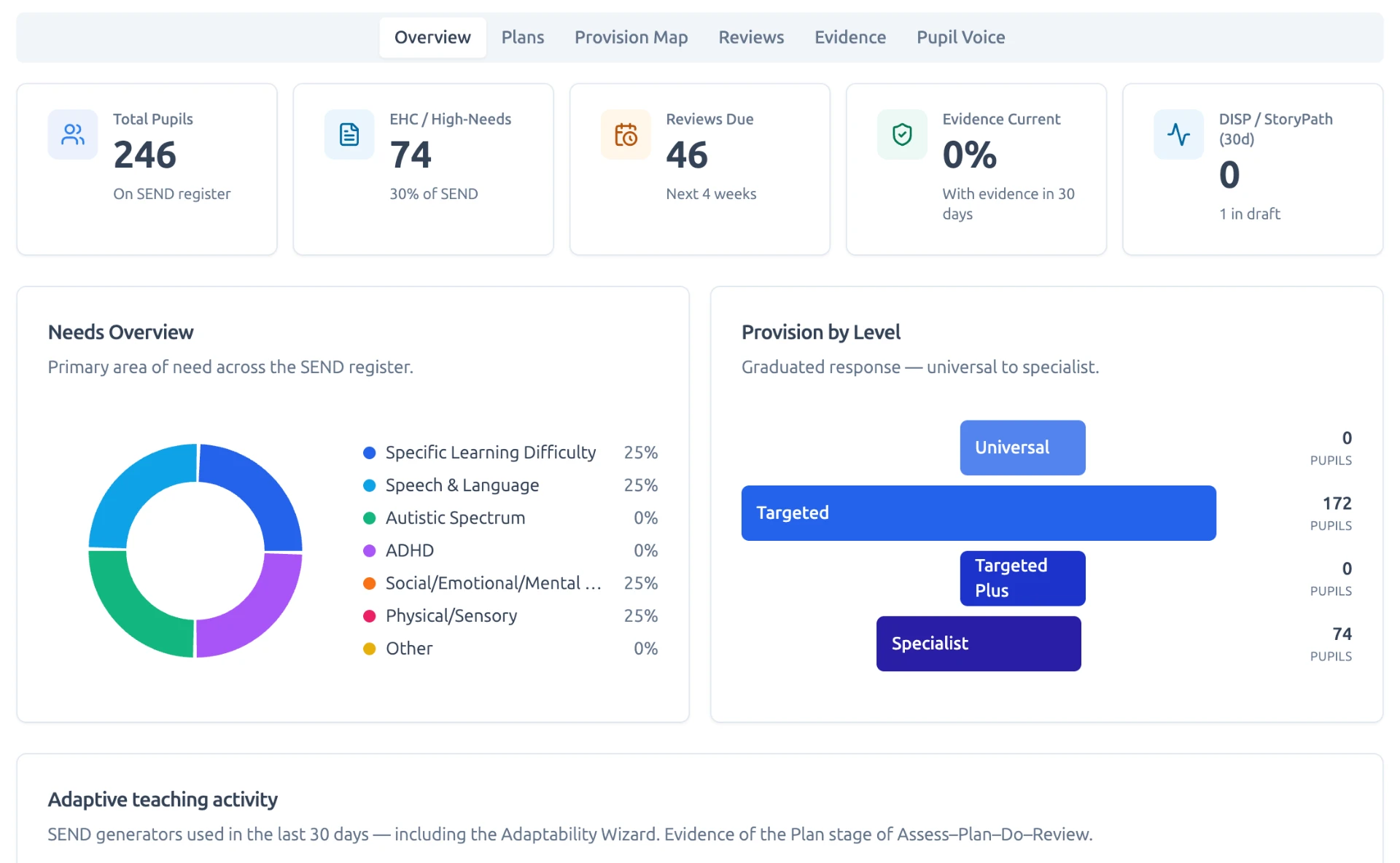
The SEND Intelligence Layer holds every pupil’s Digital ISP, class provision map and evidence in one place. SEND StoryPath turns any lesson into accessible, teacher-approved pathways for every learner.
- Digital Individual Support PlansLive, editable, DfE-aligned records with a full evidence trail.
- SENCO Command CentreReal-time KPIs on needs, provision and outcomes.
- Statutory framingAssess → Plan → Do → Review, never automated diagnosis.

Leadership
Governance and control at the core.
SLT run the school from one dashboard — headline numbers, staff and registration codes, behaviour policy, observation criteria and the school’s own policies feeding the AI. Every consequential output stays human-approved.
- Whole-school oversightAttainment, behaviour, reports and CPD in a single view.
- Your policy, your AIUpload vision, curriculum and behaviour policy to ground every output.
- Human-in-the-loopTeacher and SLT review is built into every consequential output.


Every screen here is the live platform.
These are the surfaces your teachers, pupils, caregivers, SENCo team and senior leaders use, captured from a working school account and grouped by the workflow they belong to.
LAPs - Leverage Action Points
The things that would improve individual pupil attainment are identified, evidenced, and already in the lesson plan and resources ready for review. Instantly.
A Leverage Action Point is the highest-impact next step for a pupil: small, concrete, and doable in an ordinary lesson. Teachers.guide reads the marks, marked work, independent practice and behaviour points staff have already recorded, ranks where acting now would matter most, and writes the steps in plain professional language. Nothing is estimated and nothing is invented — every point names the subject and the evidence behind it.
Headlines across the year group
Pupil Tracking opens on the five pupils where action has the most leverage right now, with the reasoning shown — subjects below the threshold, size of any recent decline, and the sanction-to-merit balance.
Written analysis per pupil
Each pupil profile carries a short analysis and three to five numbered next steps, each tied to the specific evidence it rests on, ready for a form tutor or head of year conversation.
Built into planning
When a teacher plans a lesson, the class Leverage Action Points sit alongside SEND, EAL and prior attainment, and the plan comes back with concrete in-lesson moves for those pupils — adapted scaffolding, never a lowered outcome.
A drafted picture of strengths and development areas, for SLT to review.
See modulePlanning
From a blank timetable slot to a printed, teachable lesson.
A full lesson plan — Do Now, objectives, teacher notes — editable before you print.
Every stage arrives with its own generated visual, not stock clip art.
Editable decks — image left, bullets right, misconception check built in.
Evidence-informed resources with the rationale attached.
See moduleBuild from a saved lesson plan and attach your own library files.
Timed sections and structured questions you can edit before setting.
Publish to a class with a due date — pupils and caregivers see it instantly.


Teaching
What the teacher sees while the lesson is actually running.
Who is writing, who is stuck, who has submitted — live.
See moduleMirror a draft, nudge the room, close the Zone when the lesson ends.
See moduleAssessment
Criteria in, marked work out — with the teacher in control of every word.
Set assessment criteria once — every upload is analysed against them.
An auto-drafted rubric you can edit — the AI marker then uses it.
Scan, photograph the books, upload — no scanner required.
Pupil submissions arrive in one queue — mark, check, then return.
AI feedback sits beside the pupil’s work and stays editable before sending.
Every returned marking is kept as an auditable record.
A written picture of the class — gaps, strengths and next steps.


Communication
The same task, seen by the pupil, the caregiver and the phone in their pocket.
A parent code and a message — no app, no login, no laptop.
See moduleGrounded in the actual assignment — and it coaches the parent, never the child.
See moduleSpeak to the assignment out loud — British female voice by default.
See moduleThe pupil view — classroom tasks, homework, practice and feedback.
Feedback the pupil actually reads — what went well, what to work on next.


SEND
One register, one provision map, one evidence trail.
Register-wide oversight — needs, provision level, reviews and evidence.
See modulePupil support records linked to a class become an anonymised provision map.
See moduleOne source text, six accessible pupil-ready pathways.
See moduleScaffolded pathways a teacher approves before any pupil sees them.
See module

Leadership
Setup, staffing, behaviour, attainment and quality assurance — all SLT-owned.
A guided checklist — DPA, logo, staff, policies — so a school is live in an afternoon.
See moduleHeadline numbers and the assessment data source the whole school reports against.
See moduleRegistration codes, roles and seats — added and revoked by SLT.
See moduleUpload the vision, curriculum intent and policies the AI must follow.
See moduleYour reward and sanction types, worded your way.
See moduleA whole-school log — merits and detentions visible to SLT and caregivers.
See moduleClass-by-class attainment, tracked against your own data source.
See moduleA drafted picture of strengths and development areas, for SLT to review.
See moduleObservation criteria across planning and teaching, agreed once.
See moduleJudgements on SEND support, accessibility and engagement — then a single-sentence report.
See module


Your school's Educational Intelligence Layer™.
Turn school information into classroom action. Book a personalised demo or start a free pilot.
Or call us on 020 4652 1500